
We’ve introduced Calendar integration with Caption.Ed, so you can join meetings directly without switching between tabs, stay on Caption.Ed, stay focused. Please note that you will need to download our desktop application to access this feature.
To learn how to integrate your calendar, follow the steps below:
First, you want to log into your Caption.Ed account
Next, you want to click on the “Connect your calendar” button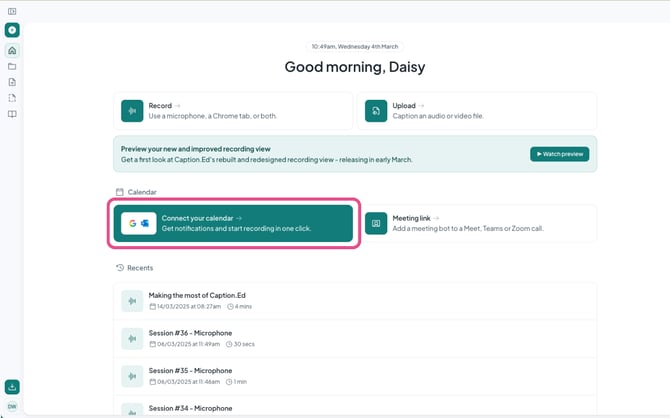
Then, you want to choose which calendar to connect, Caption.Ed is compatible with Google Calendar and Outlook Calendar.
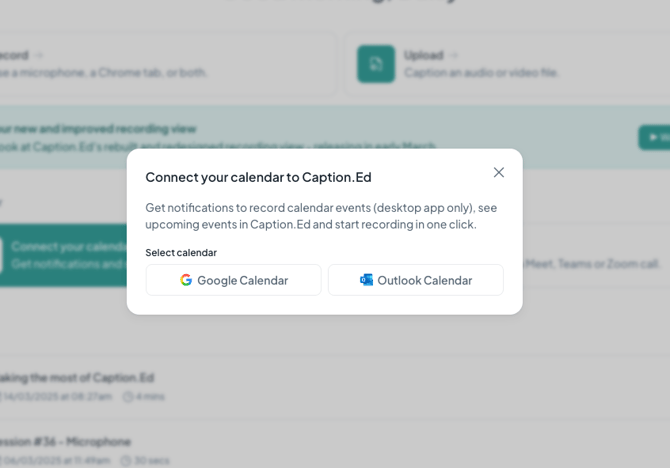
You need to make sure you have accepted all of the Google or Outlook permissions to ensure everything is connected.
Your calendar is now connected to Caption.Ed! You can see when your meetings are scheduled to begin, how many minutes remain until they start, and when they’re currently in progress.