
Do you work or study in a field with specialised terminology that you’d like Caption.Ed to transcribe accurately? Perhaps there’s a custom phrase or acronym you want to ensure is captured correctly.
You can add these words, phrases, and acronyms to your custom dictionary, helping Caption.Ed recognise them easily and produce clearer, more accurate transcripts.
To get started, open Caption.Ed in either the app or browser.
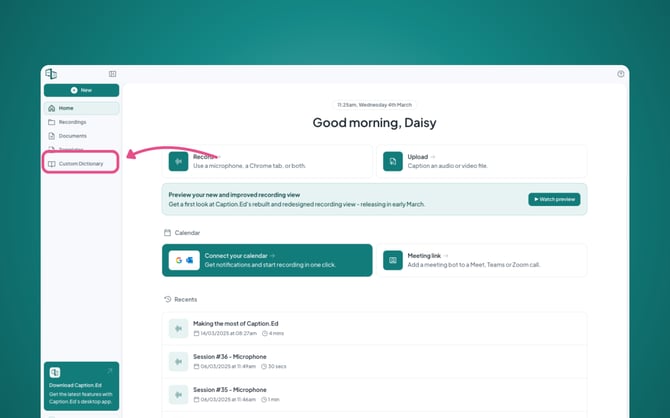
On the left-hand side you’ll find a menu, click on “Custom Dictionary” this will take you into your browser if you are accessing this feature through the app.
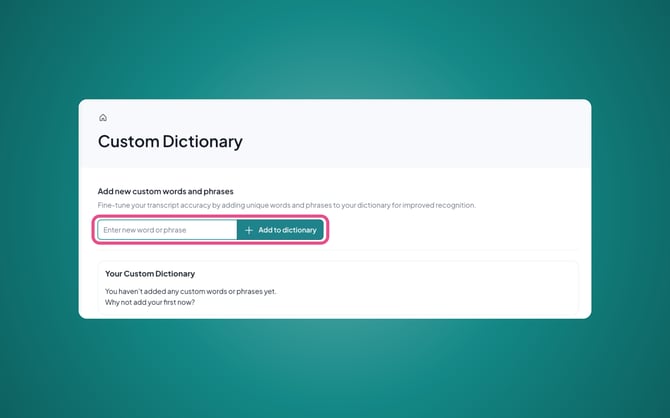
In the box provided, you can type individual words or phrases into it and press "Enter" or click the "Add to dictionary" button on the right-hand side, then these will be added to your Caption.Ed library!
Please Note: If you want to remove a custom word or phrase, simply hover over the word or phrase and click the "✖" symbol.