
Buying licenses
To buy and issue licenses, you will need to log into our reseller portal, and then go to your “Balance & Purchase” tab. Here you will find a list of available products.
To proceed with the order:
- Identify the desired license type from the list.
- In the quantity box, input the desired number of licenses. The total price will be adjusted accordingly.
- Confirm your selection by ticking the box to agree to the Terms and Conditions (Ts and Cs).
- Enter your email address.
- There's an optional field for a purchase order number. You can use this for your record-keeping purposes.
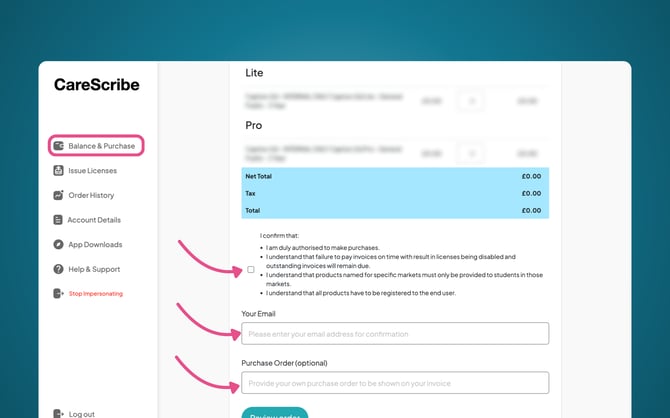
After completing these steps an email confirmation of your order will be sent to the email address you provided.
Issuing licenses
To issue a license, you will need to go into your “Issue Licenses” tab in the left-hand menu.
Here you can find the purchase order number or reference number of the order you wish to issue to an end user.
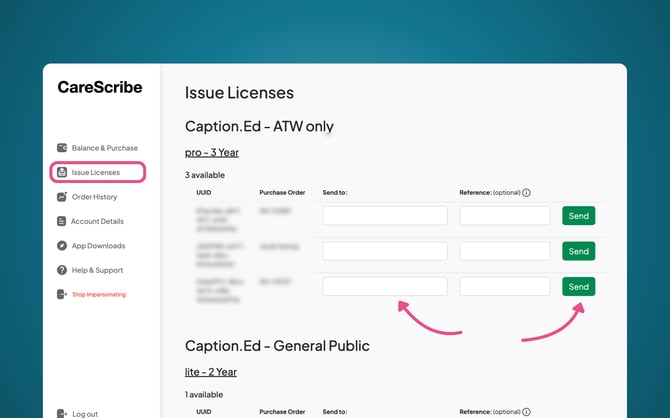
Here, you can add the end user’s email address in the “Send to” box, this will trigger an activation email to be sent to this email address, allowing them to activate their license.